
 cdkd
cdkd
cdkd state
cdkd keeps one state record per deployed stack: a JSON file in an S3
bucket that lists the stack's resources and their AWS ids. cdkd state reads
and edits those records directly.
No subcommand runs your CDK app, so you do not need the app that deployed the
stack. The subcommands work from a CI runner after the branch is gone, and on
a machine that never had the repository. You name a stack by its physical
name, which is the name cdkd state list prints.
# which bucket cdkd uses, and what is in it
cdkd state info

# one "Stack (region)" per line
cdkd state list

# logical id, type, physical id
cdkd state resources MyStack

# the whole record, with properties
cdkd state show MyStack

# pick a stack with the keyboard, then view its resources or record
cdkd state browse

# stop tracking one resource; it stays in AWS
cdkd state orphan MyStack --resource MyQueue

# delete the AWS resources, then the record
cdkd state destroy MyStack --yes

# re-read the drift baseline from AWS
cdkd state refresh-observed MyStack
Subcommands
Five subcommands only read. This page documents them. They never wait for a stack's lock, so they work while a deploy is running.
| Subcommand | Use it to |
|---|---|
info |
See which bucket cdkd uses and how many stacks it holds. |
list |
List the stacks in the bucket. |
resources |
List one stack's resources with their physical ids. |
show |
Read one stack's whole record. |
browse |
Pick a stack with the keyboard and view its resources or record. |
Four subcommands write. Each one asks for confirmation first, and cdkd state: writing subcommands documents them.
| Subcommand | Changes | Use it to |
|---|---|---|
orphan |
the state record | Stop tracking a stack or one resource. The AWS resources keep running. |
destroy |
AWS resources, then the record | Delete a stack when you no longer have its CDK app. |
refresh-observed |
the state record | Re-read the drift baseline from AWS without deploying. |
migrate |
which bucket holds the records | Copy an older, region-suffixed state bucket into the current one. |
Removing a stack: orphan or destroy
Both subcommands remove a stack from cdkd. destroy also deletes the AWS
resources, and orphan leaves them running:
Orphan Instead of Destroy compares these two with cdkd destroy and cdkd orphan, which need the CDK app.
In this section
- cdkd state: writing subcommands:
orphan,destroy,migrateandrefresh-observed, with their flags and refusals. - cdkd state: malformed records: what each subcommand prints or refuses when a record cannot be read or has an unexpected shape.
Shared options
Every subcommand takes these options. The one exception is state migrate,
which takes neither --state-bucket nor --state-prefix.
| Flag | Default | Description |
|---|---|---|
--state-bucket <bucket> |
CDKD_STATE_BUCKET / cdk.json |
S3 bucket holding the state records. |
--state-prefix <prefix> |
cdkd |
S3 key prefix for state files. |
--profile <profile> |
— | AWS profile. |
--role-arn <arn> |
CDKD_ROLE_ARN |
IAM role to assume for AWS API calls. |
-y, --yes |
off | Skip the confirmation prompt. No effect on the read-only subcommands. |
--verbose |
off | Verbose logging. |
--region is deprecated: set AWS_REGION or use your AWS profile instead.
cdkd still honors the flag, with two differences. state info rejects it, and
on state migrate it is a regular option that names the older bucket.
--stack-region: which of a name's records
The same stack name can have a record in several regions, for example when one
stack is deployed to us-east-1 and us-west-2. --stack-region <region>
picks one of those records:
cdkd state show MyStack --stack-region us-west-2
--stack-region is separate from --region. --region sets the region of
the AWS client, and --stack-region chooses a record.
When a name has records in several regions and you leave the flag out, most subcommands stop with an error, because they cannot tell which record you mean:
| Subcommand | Without --stack-region |
|---|---|
resources, show |
Error. |
orphan |
Removes the record in every region. |
orphan --resource |
Error. |
destroy |
Error. |
refresh-observed <stack> |
Error. |
refresh-observed --all |
Refreshes every region. Here the flag is a filter. |
cdkd state info
state info tells you which bucket cdkd is using and what is in it.
cdkd state info
State bucket:    cdkd-state-123456789012
Region:          us-east-1 (auto-detected via GetBucketLocation)
Source:          default (account ID from STS)
Schema version:  11
Stacks:          4
Asset storage:   legacy (CDK bootstrap) — run cdkd bootstrap to opt in
| Flag | Default | Description |
|---|---|---|
--json |
off | Print the report as one JSON object on stdout, and nothing else. |
The Source: line says where the bucket name came from:
Source: |
Meaning |
|---|---|
--state-bucket flag |
Passed on the command line. |
CDKD_STATE_BUCKET env |
From the environment variable. |
cdk.json (context.cdkd.stateBucket) |
From the app's cdk.json. |
default (account ID from STS) |
The default name, cdkd-state-{account}. |
default (legacy region-suffixed name; cdkd state migrate recommended) |
An older bucket name is in use. Run cdkd state migrate. |
This is the command to run when you need the bucket name. Other commands do
not print it, because the default name contains your AWS account id and would
end up in screenshots and public CI logs. They show it in their --verbose
debug output.
Values state info cannot read
state info reports what it can and does not fail over the rest. When it
cannot read the bucket's region, the Region: line shows unknown. The
Schema version: line shows unknown for an empty bucket and for a record
that cannot be parsed.
The schema version comes from one record. state info does not compare it
across all the records in the bucket.
cdkd state list
state list prints the stacks that have a record in the bucket, one per line
with the record's region. ls is an alias.
cdkd state list           # one "Stack (region)" per line
cdkd state list --long    # resource count, last-modified time, lock status
cdkd state list --tree    # nested stacks under their parents
cdkd state list --json
ApiStack (us-east-1)
MyStack (us-east-1)
MyStack (us-west-2)
| Flag | Default | Description |
|---|---|---|
-l, --long |
off | Show resource count, last-modified time and lock status per stack. |
--tree |
off | Draw the parent-to-child tree of nested stacks. Cannot be combined with --long. |
--json |
off | Print the listing as JSON. Works with --long and with --tree. |
cdkd list is a different command. It lists the stacks your
local CDK app defines, and cdkd state list lists what is recorded in the
bucket.
In every mode stdout carries only the listing, and warnings and log lines go to stderr. That makes the output safe to pipe:
cdkd state list | while read -r stack region; do
  echo "$stack is recorded in $region"   # region arrives in parentheses
done
The plain listing reads no record. --long
costs two extra S3 requests per stack, one for the record and one for its
lock. --tree costs one.
--long
--long prints a block per stack with its resource count, the time the record
was last written, and whether a lock is held.
cdkd state list --long
ApiStack (us-east-1)
  Region: us-east-1
  Resources: 23
  Last Modified: 2026-10-08T09:14:02.000Z
  Lock: unlocked

MyStack (us-east-1)
  Region: us-east-1
  Resources: 2
  Last Modified: 2026-10-10T16:40:51.000Z
  Lock: locked
--long --json prints one object per stack with these fields:
| Field | Value |
|---|---|
stackName, region |
The stack. region is null for a legacy record without one. |
resourceCount |
Number of resources, or null when it could not be counted. |
lastModified |
ISO timestamp, or null. |
locked |
true, false, or null when the lock could not be read. |
stateReadError, stateReadErrorKind |
Why the record could not be read or counted. Both null otherwise. |
lockReadError |
Why the lock could not be read. null otherwise. |
One stack that cannot be read does not fail the listing. Its row shows
unknown with a reason, and the command still exits 0.
Rows state list --long could not read
explains those rows and the error fields.
--tree
--tree draws each nested stack under its parent. A nested stack's name is
its parent's name, a ~, and the child's logical id.
cdkd state list --tree
NestedStackDeep (us-east-1)
└── NestedStackDeep~Child (us-east-1)
    └── NestedStackDeep~Child~Grandchild (us-east-1)
--tree --json prints the same tree as nested objects with the fields
stackName, region, parentStack, parentLogicalId, parentRegion and
children.
Every record appears exactly once, including in two unusual cases:
- A child whose parent record is missing is shown at the root instead of disappearing.
- The tree is capped at 100 levels. A record that would sit deeper is shown at the root instead, and its chain continues from there. A parent chain more than 100 levels deep is therefore drawn in several pieces.
CloudFormation stops at five levels of nested stacks, so only an app that deploys solely through cdkd can reach the cap.
Unusual stack names
Every real stack name and region is a plain identifier, and cdkd prints it as
it is. A stored value that contains a space, a bracket, a quote or a non-ASCII
character is printed inside double quotes, and a very long one is cut. Use
--json when a script needs the exact stored values.
Names that are quoted or cut
has the rules.
Listing the bucket without cdkd
The records are ordinary S3 objects, so the AWS CLI can list them when cdkd is not installed:
aws s3 ls s3://cdkd-state-123456789012/cdkd/ --recursive \
  | grep state.json \
  | awk '{print $4}' \
  | sed 's|cdkd/||; s|/state.json||'
# Prints <stackName>/<region>, one row per record.
cdkd state resources
state resources lists the resources cdkd recorded for one stack, sorted by
logical id.
cdkd state resources MyStack
JobsTable1A2B3C4D      AWS::DynamoDB::Table  MyStack-JobsTable1A2B3C4D-9QK2M
UploadsBucket5E5E9B33  AWS::S3::Bucket       mystack-uploadsbucket5e5e9b33-k2j4h8x1
The three columns are the logical id, the resource type and the physical id. There is no header row, so the output can be piped.
| Flag | Default | Description |
|---|---|---|
-l, --long |
off | Print each resource as a block with its dependencies and attributes. |
--json |
off | Print the resources as a JSON array. Takes precedence over --long. |
--stack-region <region> |
— | Region of the record to read. |
--long adds each resource's dependencies and the attributes cdkd recorded
for it, such as its ARN:
cdkd state resources MyStack --long
JobsTable1A2B3C4D
  Type: AWS::DynamoDB::Table
  PhysicalID: MyStack-JobsTable1A2B3C4D-9QK2M
  Dependencies: (none)
  Attributes:
    Arn: arn:aws:dynamodb:us-east-1:123456789012:table/MyStack-JobsTable1A2B3C4D-9QK2M
No mode of this subcommand prints resource properties. Use
cdkd state show for those.
Physical ids that contain |
AWS identifies some resource types by more than one field. For those types the
physical id is several values joined with |, and it is not the value Ref
returns. State Store explains these ids.
cdkd state show
state show prints everything in one stack's record: its metadata, its lock,
its outputs, and every resource with its properties.
cdkd state show MyStack
Stack: MyStack
  Region: us-east-1
  Version: 11
  Last Modified: 2026-10-10T16:40:51.000Z
  Lock: unlocked

Outputs:
  QueueUrl: https://sqs.us-east-1.amazonaws.com/123456789012/MyStack-JobsQueue7C2B1F0E-Zk3mQ

Resources (1):

JobsQueue7C2B1F0E
  Type: AWS::SQS::Queue
  PhysicalID: https://sqs.us-east-1.amazonaws.com/123456789012/MyStack-JobsQueue7C2B1F0E-Zk3mQ
  ProvisionedBy: sdk
  Dependencies: (none)
  Attributes:
    Arn: arn:aws:sqs:us-east-1:123456789012:MyStack-JobsQueue7C2B1F0E-Zk3mQ
  Properties:
    VisibilityTimeout: 300
Each resource block shows the resource's properties, attributes and
dependencies. ProvisionedBy names the layer that created the resource: sdk
for cdkd's SDK providers, or cc-api for the AWS Cloud Control API.
| Flag | Default | Description |
|---|---|---|
--json |
off | Print the stored record and its lock as JSON: {state, lock}. |
--show-nested |
off | Also print every nested stack under this one. |
--stack-region <region> |
— | Region of the record to read. |
Use --json when you need the stored values exactly, for example to inspect a
record that another command refused. The text output shortens and filters some
values, and --json does not.
--show-nested
--show-nested prints the stack and then every nested stack below it.
cdkd state show MyParent --show-nested
Stack: MyParent
  ...

Nested stack: MyParent~Child
Stack: MyParent~Child
  ...
Each nested stack's block follows its parent's block, depth first, behind its
own Nested stack: header. With --json the shape becomes
{state, lock, children: [...]}. children is always present, and it is
empty for a stack with no nested stacks.
A parent can list a nested stack whose record does not exist. --show-nested
then fails and prints no partial tree. To repair the tree, deploy the parent
again or finish the operation that was interrupted. If neither works, remove
the parent's record with
cdkd state orphan and import the
stack again.
Skipped outputs
A deploy sometimes cannot resolve a stack output. It then records the
output's key, and state show lists such keys in a Skipped outputs: block.
Each key is followed by a digest of that output's template inputs:
Skipped outputs:
  ApiUrl: 1f3c9a0b7d42…

The last deploy could not resolve the keys listed under `Skipped outputs:`
above, and recorded a digest of their template inputs. While the record
binds and a key is still absent from the stored outputs, `cdkd diff`
previews it as ABSENT — no row, no warning. A key whose earlier value
was retained is also stored under `Outputs:` here, where the record does
NOT suppress it: the ordinary rules apply, up to `cdkd diff` suppressing
its whole Outputs section if the key still cannot resolve.
Binding rule: `bindingSkippedOutputs` in src/analyzer/skipped-outputs.ts.
Look here when cdkd diff shows nothing for an output you expect. cdkd diff
prints no row and no warning for a skipped key, so this block is the only
place that explains the missing row.
Three things to know when you read the block:
- The block appears only when the deploy recorded something. A record without the block does not prove that nothing was skipped.
- The
Outputs:block is left out when no output has a value, soSkipped outputs:can appear without it. - The digest is cut to 12 characters. Two different prefixes mean two
different digests, but two equal prefixes prove nothing. Compare whole
digests with
--json.
Edge cases
- A record with an unexpected shape.
state showandstate resourcesprint what they can and warn on stderr. cdkd state: malformed records lists what each mode prints. - A nested stack's resource shows
ProvisionedBy: cc-apithat you did not ask for. An older cdkd release could record that. See When a nested resource shows the wrongprovisionedBy.
cdkd state browse
Pick a stack from the state bucket with the keyboard, then view it, without copying its name into another command.
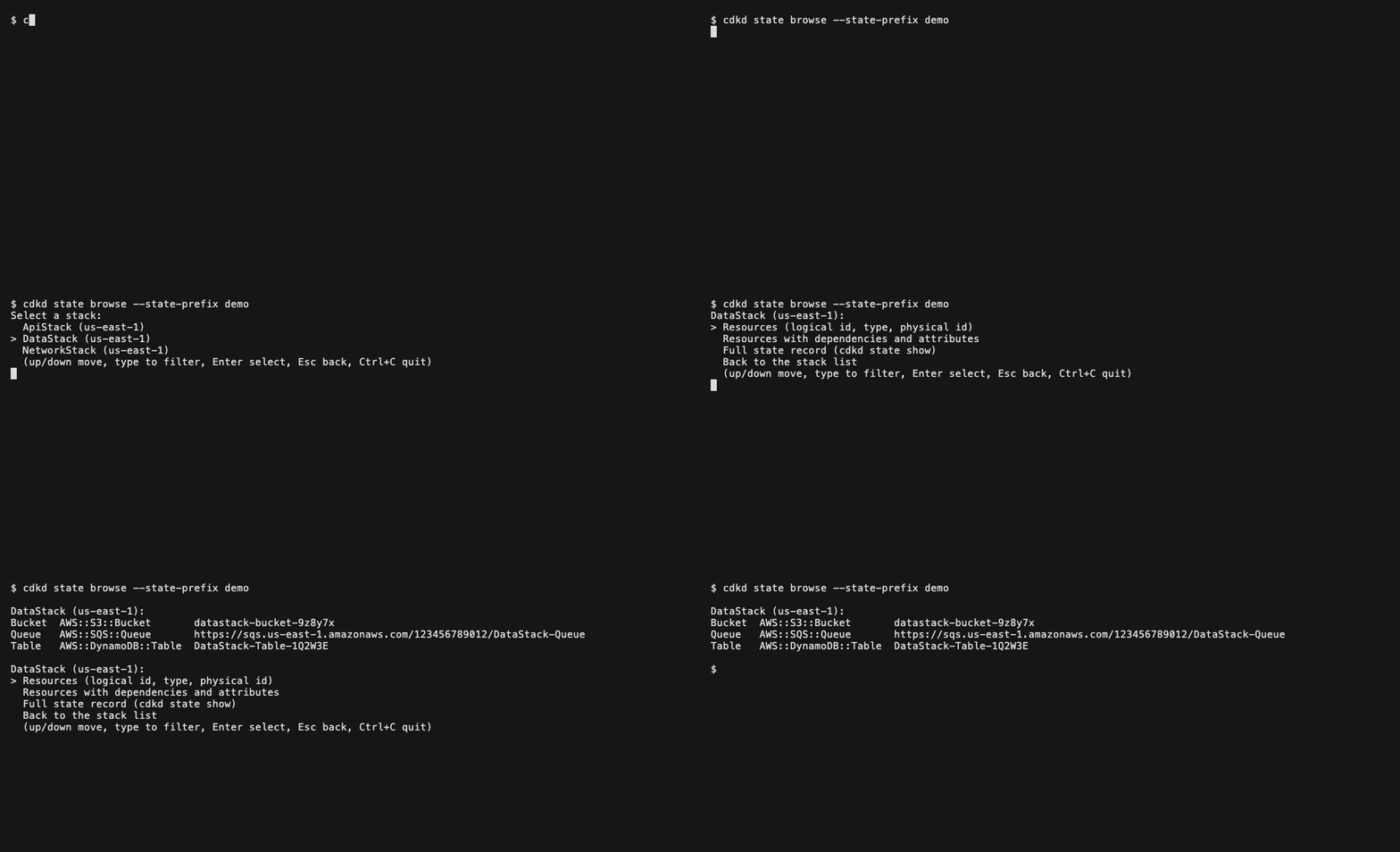
cdkd state browse
cdkd state browse --state-prefix staging
The first list holds every stack in the bucket, as cdkd state list prints
it. Pick one, then pick a view:
| View | Prints what this command prints |
|---|---|
| Resources | cdkd state resources <stack> |
| Resources with dependencies and attributes | cdkd state resources <stack> --long |
| Full state record | cdkd state show <stack> |
The view prints below the menu, and the menu comes back for the same stack.
| Key | Does |
|---|---|
| Up / Down | Move. |
| Any letter or digit | Filter the list to the entries that contain what you typed. Backspace removes a character. |
| Enter | Pick. Keys pressed while a view is still printing are dropped. |
| Esc | Go back: from a stack's menu to the stack list, and from the stack list out of the command. |
| Ctrlc | Quit; the command exits 0. |
It needs an interactive terminal. In a pipe or a CI job it exits 1 before
any AWS call, naming cdkd state list, cdkd state resources and
cdkd state show, which work there. It takes the shared options.
Exit codes
| Code | Meaning |
|---|---|
0 |
Success, including a declined confirmation prompt and a run with nothing to do. |
1 |
Failure: a missing record, an ambiguous region, a held lock, a prompt in a non-interactive shell, or an AWS or S3 error. |
2 |
Partial completion. state destroy: per-resource delete failures, skips, or an interruption with targets left. state refresh-observed: per-resource read failures, including a resource AWS reports as not found. |
130 |
A destroy force-quit with Ctrlc: a second press, or one before the stack's graceful stop was armed. A stack lock may be left behind; the message names cdkd force-unlock. |
state destroy and state refresh-observed are documented on
cdkd state: writing subcommands, with the confirmation
prompt every writing subcommand shows.
Related
- Manage Stacks Without the App: the same subject, summarised for a first read
- State Store: the record schema, the key layout and the lock
- Orphan Instead of Destroy: which cleanup command to reach for
- CLI Reference: every command and the full exit-code table
- Troubleshooting: what to do when a state record and AWS disagree
- cdkd state internals: rendering and refusal rules, for contributors